AV over IP มืออาชีพ • Dante Audio• ระบบควบคุม
หน้าแรก สินค้า
ระบบภาพ
ระบบส่งสัญญาณภาพผ่าน IPเมทริกซ์สวิตช์ HDMIเมทริกซ์สวิตช์แบบโมดูลาร์อุปกรณ์ประมวลผลภาพตัวแยกสัญญาณ / สวิตช์ / ตัวแปลงสัญญาณอุปกรณ์ขยายสัญญาณและสายเคเบิลจอ LEDกล้อง PTZระบบควบคุมกล้อง PTZ
🔊ระบบเสียง
มิกเซอร์อินเตอร์เฟสโปรเซสเซอร์ไมโครโฟนเพาเวอร์แอมป์ลำโพงชุดเครื่องเสียงเคลื่อนที่ดิจิทัลออดิโอโปรเซสเซอร์Dante Converterแอมป์รวมระบบ AVPoE Switchลำโพง PoEโมดูลแอมป์ Danteไมโครโฟน Danteสถานีประกาศซอฟต์แวร์เล่นเสียง
🎛️ระบบควบคุม
อุปกรณ์ควบคุมเครื่องควบคุมลำดับการจ่ายไฟหน้าจอควบคุมระบบแบบทัชสกรีน PoEอุปกรณ์เสริมระบบควบคุม
🧩อุปกรณ์เสริม
AdapterRackขาตั้งลำโพงขาตั้งไมโครโฟนสายสัญญาณไฟเลี้ยง / Power
แบรนด์
DesignProYamahaAllen & HeathFBT AUDIOTOAShure แบรนด์ โซลูชัน โปรเจกต์ เกี่ยวกับเรา โปรไฟล์บริษัท บริการ OEM / ODM พาร์ทเนอร์ชิป ใบรับรอง การรับประกัน บทความ เอกสารเทคนิค ติดต่อเรา ⚡︎ โปรโมชั่น 📞 ขอใบเสนอราคา English
หน้าแรก› สินค้า› ระบบภาพ› VX1-801-KVM
ระบบภาพ

VX1-801-KVM

จัดส่งภายใน 5-7 วัน
7 ครั้งที่ดู 0 ขายแล้ว
มีของ
ติดต่อฝ่ายขาย

ช่องทางติดต่อ

สนใจสินค้า ติดต่อสอบถามเพิ่มเติมได้ทันที
รับประกัน 1 ปีรับประกันไทยอย่างเป็นทางการ
จัดส่งไว1-3 วันทำการ
บริการหลังการขายทีมวิศวกรพร้อมให้บริการ
ผ่อน 0%ผ่อนได้สูงสุด 10 เดือน
รับประกันศูนย์ไทย5 ปี
ออกแบบระบบฟรีให้คำปรึกษา
ซัพพอร์ตเทคนิคช่วยเหลือทางไกล
อบรมออนไลน์สำหรับพาร์ทเนอร์
มีอะไหล่พร้อมสต๊อกในไทย

ภาพรวมสินค้า

Introduction

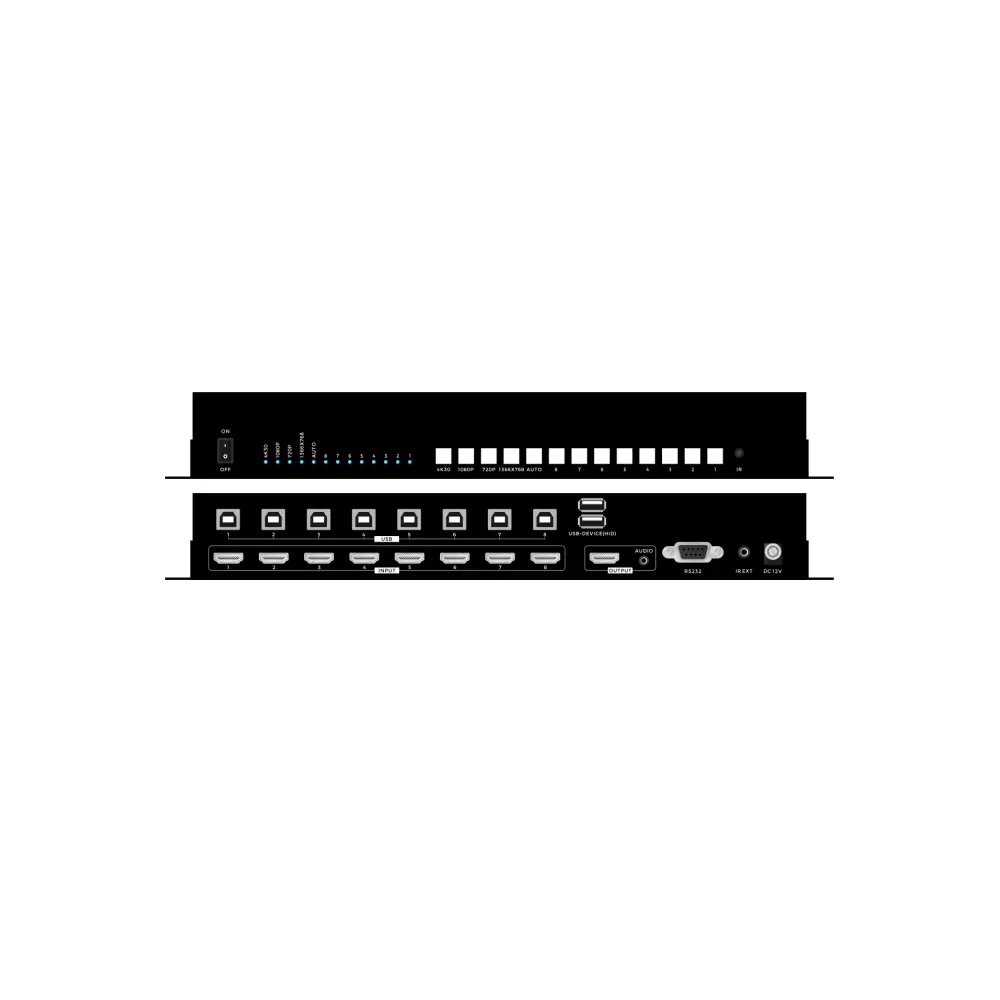
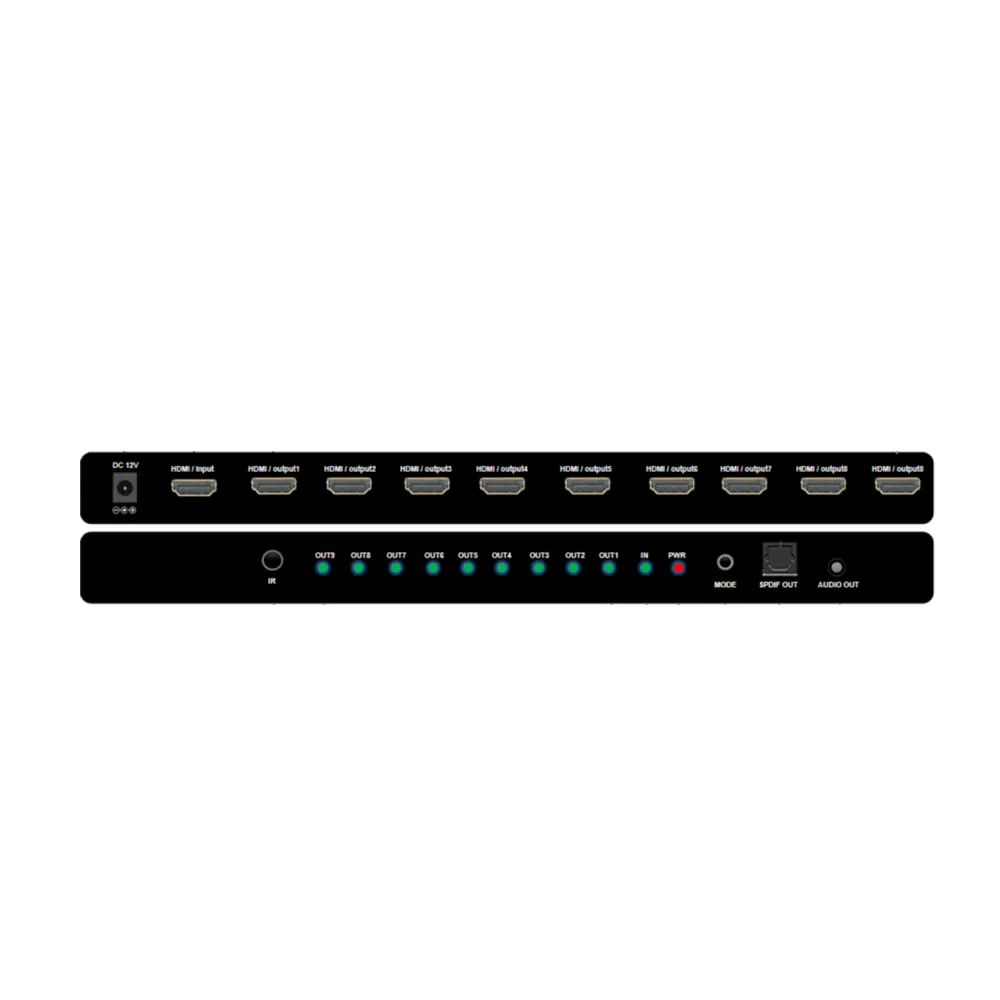
This product is an HDMI 4K seamless and scaling switcher, supports automatic switching and manual switching, supports switching from 8 HDMI with 8 USB-B inputs to 1 HDMI output with 2 USB-A for Keyboard&mouse, and 8 HDMI inputs support different arbitrary resolutions with seamless switching and scaling. The HDMI output supports fixed resolutions output, which can be selected through the front panel buttons, infrared remote control, RS232 serial port commands and the Keyboard Hot-key switching. Also supports EDID management through RS232 commands.

Features

• Support HDMI1.4, and the resolution up to 3840*2160@30Hz;

• Support CEC, ARC follow

• Support seamless switching even when different resolutions inputs;

• Support auto and manual switching modes

• Support the front panel push-button, IR remote and the RS232 control and Hot-key

• Support EDID management by RS232 commands

• Support work and standby power saving modes

• Support 8 USB-B inputs and 2 USB-A outputs

Specification

Keyboard Hot-key switch and RS232 commands

*Baud rate is 115200, data bit is 8, stop bit is 1, check bit: none

เหมาะกับการใช้งาน
ห้องประชุม
ออดิทอเรียม
โรงแรม
มหาวิทยาลัย
งานถ่ายทอด/บรอดแคสต์
ห้องพิจารณาคดี
ศูนย์สั่งการ

สเปคทางเทคนิค

Input8*HDMI, 8*USB-B
Output1*HDMI+3.5mm audio, 2* USB-A
Protocol StandardHDMI1.4, HDCP1.4
Resolution(8)3840*2160@30\1920*1080@60\1280*720@60\1366*768@60
Dimension250*100*46mm
Weight0.5kg(1.1lb)(No packing)
Power SupplyDC 12V 1A
Consumption5W
Working Humidity10%-90%
Temperature-10℃-50℃
Storage-20℃-75℃
Ctrl +Ctrl +1Switch to HDMI input 1 (RS232 command: AT+HTSWIN=SC81,1$)
Ctrl +Ctrl +2Switch to HDMI input 2 (RS232 command: AT+HTSWIN=SC81,2$)
Ctrl +Ctrl +3Switch to HDMI input 3 (RS232 command: AT+HTSWIN=SC81,3$)
Ctrl +Ctrl +4Switch to HDMI input 4 (RS232 command: AT+HTSWIN=SC81,4$)
Ctrl +Ctrl +5Switch to HDMI input 5 (RS232 command: AT+HTSWIN=SC81,5$)
Ctrl +Ctrl +6Switch to HDMI input 6 (RS232 command: AT+HTSWIN=SC81,6$)
Ctrl +Ctrl +7Switch to HDMI input 7 (RS232 command: AT+HTSWIN=SC81,7$)
Ctrl +Ctrl +8Switch to HDMI input 8 (RS232 command: AT+HTSWIN=SC81,8$)
Ctrl +Ctrl +ASwitch to the Auto mode ( RS232 command: AT+HTSWMOD=SC81,1$)
Ctrl +Ctrl +MSwitch to the manual mode (RS232 command: :AT+HTSWMOD=SC81,2$)
Ctrl +Ctrl +HSwitch to the HDMI format (RS232 command: AT+HTOUTMOD=SC81,1,1$)
Ctrl +Ctrl +DSwitch to the DVI format (RS232 command: AT+HTOUTMOD=SC81,2,1$)
Ctrl +Ctrl +F1Switch the output resolution to 720P (RS232 command: AT+HTSETOUTRES=SC81,1,1$)
Ctrl +Ctrl +F2Switch the output resolution to 1366*768 (RS232 command: AT+HTSETOUTRES=SC81,2,1$)
Ctrl +Ctrl +F3Switch the output resolution to 1080P (RS232 command: AT+HTSETOUTRES=SC81,3,1$)
Ctrl +Ctrl +F4Switch the output resolution to 4K30 (RS232 command: AT+HTSETOUTRES=SC81,4,1$)

คุณสมบัติเด่น

ดูทั้งหมด ›
Support HDMI1.4, and the resolution up to 3840*2160@30Hz;
Support CEC, ARC follow
Support seamless switching even when different resolutions inputs;
Support auto and manual switching modes
Support the front panel push-button, IR remote and the RS232 control and Hot-key
Support EDID management by RS232 commands
Support work and standby power saving modes
Support 8 USB-B inputs and 2 USB-A outputs
เฟิร์มแวร์เวอร์ชันล่าสุด
เทมเพลต DSPดาวน์โหลด
แบบ AutoCADแบบแปลน
ไฟล์ EASEข้อมูลอะคูสติก

คุณสมบัติเด่น

  • Support HDMI1.4, and the resolution up to 3840*2160@30Hz;
  • Support CEC, ARC follow
  • Support seamless switching even when different resolutions inputs;
  • Support auto and manual switching modes
  • Support the front panel push-button, IR remote and the RS232 control and Hot-key
  • Support EDID management by RS232 commands
  • Support work and standby power saving modes
  • Support 8 USB-B inputs and 2 USB-A outputs

สเปคทางเทคนิค

Input8*HDMI, 8*USB-B
Output1*HDMI+3.5mm audio, 2* USB-A
Protocol StandardHDMI1.4, HDCP1.4
Resolution(8)3840*2160@30\1920*1080@60\1280*720@60\1366*768@60
Dimension250*100*46mm
Weight0.5kg(1.1lb)(No packing)
Power SupplyDC 12V 1A
Consumption5W
Working Humidity10%-90%
Temperature-10℃-50℃
Storage-20℃-75℃
Ctrl +Ctrl +1Switch to HDMI input 1 (RS232 command: AT+HTSWIN=SC81,1$)
Ctrl +Ctrl +2Switch to HDMI input 2 (RS232 command: AT+HTSWIN=SC81,2$)
Ctrl +Ctrl +3Switch to HDMI input 3 (RS232 command: AT+HTSWIN=SC81,3$)
Ctrl +Ctrl +4Switch to HDMI input 4 (RS232 command: AT+HTSWIN=SC81,4$)
Ctrl +Ctrl +5Switch to HDMI input 5 (RS232 command: AT+HTSWIN=SC81,5$)
Ctrl +Ctrl +6Switch to HDMI input 6 (RS232 command: AT+HTSWIN=SC81,6$)
Ctrl +Ctrl +7Switch to HDMI input 7 (RS232 command: AT+HTSWIN=SC81,7$)
Ctrl +Ctrl +8Switch to HDMI input 8 (RS232 command: AT+HTSWIN=SC81,8$)
Ctrl +Ctrl +ASwitch to the Auto mode ( RS232 command: AT+HTSWMOD=SC81,1$)
Ctrl +Ctrl +MSwitch to the manual mode (RS232 command: :AT+HTSWMOD=SC81,2$)
Ctrl +Ctrl +HSwitch to the HDMI format (RS232 command: AT+HTOUTMOD=SC81,1,1$)
Ctrl +Ctrl +DSwitch to the DVI format (RS232 command: AT+HTOUTMOD=SC81,2,1$)
Ctrl +Ctrl +F1Switch the output resolution to 720P (RS232 command: AT+HTSETOUTRES=SC81,1,1$)
Ctrl +Ctrl +F2Switch the output resolution to 1366*768 (RS232 command: AT+HTSETOUTRES=SC81,2,1$)
Ctrl +Ctrl +F3Switch the output resolution to 1080P (RS232 command: AT+HTSETOUTRES=SC81,3,1$)
Ctrl +Ctrl +F4Switch the output resolution to 4K30 (RS232 command: AT+HTSETOUTRES=SC81,4,1$)

ดาวน์โหลดเอกสาร

ยังไม่มีเอกสารสำหรับสินค้านี้

วิดีโอแนะนำสินค้า

ยังไม่มีวิดีโอสำหรับสินค้านี้

อุปกรณ์เสริมที่แนะนำ

สวิตช์เครือข่าย
ตู้แร็ค
เพาเวอร์ซีเควนเซอร์
แผงควบคุมแบบสัมผัส
ชุดจัดเก็บสายเคเบิล

รีวิวจากลูกค้า

ยังไม่มีรีวิวสาธารณะสำหรับสินค้านี้

คำถามที่พบบ่อย

Qมีบริการติดตั้งและออกแบบไหม?
Aมีบริการครบ ทีมงานช่วยออกแบบและติดตั้งให้พร้อมใช้งาน
Qขอใบเสนอราคาได้อย่างไร?
Aกดปุ่ม "ขอใบเสนอราคา" หรือทัก LINE
ออกแบบระบบฟรีออกแบบโซลูชันโดยทีมวิศวกร
บริการติดตั้งหน้างานติดตั้งและทดสอบโดยวิศวกรที่รับรอง
อบรมการใช้งานอบรมสินค้าสำหรับผู้ใช้และผู้วางระบบ
รับประกันขยายเวลารับประกันเพิ่มได้สูงสุด 7 ปี
เป็นพาร์ทเนอร์ร่วมเป็นพาร์ทเนอร์เติบโตไปด้วยกัน
banner banner
banner banner